Search This Blog

Saturday, 22 June 2013

Footprinting -The Ultimate Guide


=> What Is Footprinting?

Footprinting is the first and most convenient way that hackers use to gather information
about computer systems and the companies they belong to.  The purpose of footprinting to
learn as much as you can about a system, it's remote access capabilities, its ports and
services, and the aspects of its security.

In order to perform a successful hack on a system, it is best to know as much as you can,
if not everything, about that system.  While there is nary a company in the world that
isn't aware of hackers, most companies are now hiring hackers to protect their systems.
And since footprinting can be used to attack a system, it can also be used to protect it.
If you can find anything out about a system, the company that owns that system, with the
right personell, can find out anything they want about you.

In this talk, I will explain what the many functions of footprinting are and what they do.
I'll also footprint everyone's favorite website, just to see how much info we can get on
Grifter.

=> Open Source Footprinting

Open Source Footprinting is the easiest and safest way to go about finding information
about a company.  Information that is available to the public, such as phone numbers,
addresses, etc.  Performing whois requests, searching through DNS tables, and scanning
certain IP addresses for open ports, are other forms of open source footprinting.  Most
of this information is fairly easy to get, and getting it is legal, legal is always good.

Most companies post a shit load of information about themselves on their website.  A lot
of this information can be very useful to hackers and the companies don't even realize it.
It may also be helpful to skim through the webpage's HTML source  to look for comments.
Comments in HTML code are the equivalent to the small captions under the pictures in high
school science books.  Some comments found in the HTML can hold small tid-bits of info
about the company, otherwise not found anywhere else.

=> Network Enumeration

Network Enumeration is the process of identifying domain names and associated networks.
The process is performing various queries on the many whois databases found on the
internet.  The result is the hacker now having the information needed to attack the system
they are learning about.  Companie's domain names are listed with registrars, and the
hacker would simply query the registrar to obtain the information they are looking for.
The hacker simply needs to know which registrar the company is listed with.  There are
five types of queries which are as follows:

Registrar Query:  This query gives information on potential domains matching the
target.

Organizational Query:  This is searching a specific registrar to obtain all
instances of the target's name.  The results show many different domains associated
with the company.

Domain Query:  A domain query is based off of results found in an organizational
query.  Using a domain query, you could find the company's address, domain name,
administrator and his/her phone number, and the system's domain servers.  The
administrative contact could be very useful to a hacker as it provides a purpose
for a wardialer.  This is also where social engineering comes into play.  But
that's a talk for another time.  Many administrators now post false phone numbers
to protect themselves from this.

Network Query:  The fourth method one could use the American Registry for Internet
Numbers is to discover certain blocks owned by a company.  It's good to use a
broad search here, as well as in the registrar query.

POC Query:  This query finds the many IP adresses a machine may have.

=> DNS Interrogation

After gathering the information needed using the above techniques, a hacker would begin to
query the DNS.  A common problem with system adminstrators is allowing untrusted, or worse,
unknown users, to perform a DNS Zone Transfer.  Many freeware tools can be found on the
internet and can be used to perform DNS interrogation.  Tools such as nslookup, for PC, and
AGnet Tools, for Mac, are some common programs used for this.

=> Other Helpful Techniques Used In Footprinting

Ping Sweep:  Ping a range of IP addresses to find out which machines are awake.

TCP Scans:  Scan ports on machines to see which services are offered.  TCP scans
can be performed by scanning a single port on a range of IPs, or by scanning a
range of ports on a single IP.  Both techniques yeild helpful information.

UDP Scans:  Send garbage UDP packets to a desired port.  I normally don't perform
UDP scans a whole lot because most machines respond with an ICMP 'port unreachable'
message.  Meaning that no service is available.

OS Indentification:  This involves sending illegal ICMP or TCP packets to a machine.

The machine responds with unique invalid inputs and allows the hacker to find out what the
target machine is running.

=> Let's Try It!

Ok, I've explained as best I can what the functions of footprinting are.  Now we're going
to actually use them.  Let's footprint 2600slc.org to find out as much as we can about
Grifter.  Keep in mind that I am using a mac and I don't know the necessary tools to use
on a PC when footprinting.  For all the procedures listed below, I will be using a utility
known as AGnet Tools version 2.5.1.  This application allows you to use all of the basic
funtions of footprinting in one easy to use program.  I know there are other security
auditing tools for the mac out there which offer more functions, but AGnet is the most
user friendly program I can find.

Now, just by looking at the website, we know where the 2600 meetings are held and at what
time.  This information really isn't useful right now because you obviously managed to find
your way here.  Good for you.  We find that Grifter also runs staticdischarge.org, and by
going further into the website, we find that Grifter has three main email contacts which
are:

grifter@staticdischarge.com
grifter@linuxninjas.org
and grifter@hackinthebox.org

Ok, we have Grifter's three emails which we will use later.  But for now, let's get some
information on 2600slc.org.  We type in 2600slc.org into the prompt of the Name Lookup
window in AGnet tools, and our result is this IP address:

207.173.28.130

But wait, just out of curiosity, what is the IP of staticdischarge.org?  We type the domain
into the Name Lookup prompt and we are given the same IP.  We can safely say that
2600slc.org and staticdischarge.org are hosted on the same box.  But if I were to do a
reverse name lookup on the IP, which domain will come up?  2600slc.org or
taticdischarge.org?  Neither, the result is linuxninjas.org.  Ah ha!  So linuxninjas.org
is the name of the box hosting 2600slc.org and staticdischarge.org.  Neat!

So now that we have the IP, let's check to see if linuxninjas is awake.  We type the IP
into the prompt in the Ping window.  We'll set the interval between packets to 1
millisecond.  We'll set the number of seconds to wait until a ping times out to 5.  We'll
set the ping size to 500 bytes and we'll send ten pings.

Ten packets sent and ten packets received.  Linuxninjas.org returned a message to my
computer within an average of 0.35 seconds for every packet sent.  Linuxninjas is alive
and kicking.

Moving on.  Remember Grifter's three email addresses?  What can we do with those?  This is
where Finger comes in.  A lot of businesses nowadays don't run finger, because it reveals
too much information about any one user on a system.  But of course, it never hurts to try.
Let's enter Grifter's emails into the prompt in the Finger window.

grifter@staticdischarge.com = Finger failed.
grifter@linuxninjas.org = Finger failed.
grifter@hackinthebox.org = Finger failed.

Like I said, a lot of systems no longer use finger.

Ok, since Finger gave us bupkuss, let's move on to Whois.  We open the Whois window and
type linuxninjas.org into the Query prompt, and whois.networksolutions.com into the Server
prompt.  This means we'll be asking Network Solutions to tell us everything they know about
linuxninjas.org.

The result is this laundry list of info:

Registrant:
Static Discharge (LINUXNINJAS-DOM)
p.o.box 511493
SLC, UT 84151
US

Domain Name: LINUXNINJAS.ORG

Administrative Contact, Billing Contact:
Wyler, Neil  (NWB43)  grifter212@uswest.net
Static Discharge
p.o.box 511493
SLC, UT 84151
801-773-6103

Technical Contact:
sutton, kenny  (KS16306)  root@HEKTIK.COM
hektik
p.o.box 511493
SLC, UT 84151
877-828-3849

Record last updated on 17-Aug-2001.
Record expires on 11-Aug-2002.
Record created on 11-Aug-2000.
Database last updated on 12-Dec-2001 04:06:00 EST.

Domain servers in listed order:

NS1.HEKTIK.ORG    207.173.28.130
NS2.HEKTIK.ORG    64.81.168.80

Wow.  Check this out.  But remember that a lot of sysadmins post false info into their
registrars database.  So these phone numbers could be payphones, and these addresses could
be whore houses.  But as far as we know, we now have Grifter's real name, his address and
his phone number.  We also have the same for Kenny.  We can see when Grifter registered
linuxninjas.org, when it expires, and when it was last updated.  And look!  We have
another one of Grifter's email addresses.  Lets run it through Finger just for kicks.

grifter212@uswest.net = Finger failed.  Oh well.

Well, now that we have a bit of personal info on Grifter, let's check back with
linuxninjas.org.

A corner stone of footprinting is Port Scanning.  Let's port scan linuxninjas.org and see
what kind of services are running on that box.  We type in the linuxninjas IP into the Host
prompt of the Port Scan window.  We'll start searching from port number 1, and we'll stop
at the default Sub7 port, 27374.  Our results are:

21    TCP    ftp
22    TCP    ssh    SSH-1.99-OpenSSH_2.30
25    TCP    smtp
53    TCP    domain
80    TCP    www
110    TCP    pop3
111    TCP    sunrpc
113    TCP    ident

Just by this we know that Grifter is running a website and email, (duh), using POP3,
(Post Office Protocal version 3), SUNRPC (SUN Remote Procedure Call), and ident.  This
could lead to some fun trying to access his FTP, or telnetting to his SMTP and sending
your mom midget porn through his email address.

=> Conclusion

All of these functions are very basic.  They are simpe and easy to use.  And above all,
they are legal.  As I said in the introduction, legal is always good.  Whenever
footprinting a system, keep in mind that you could find something that you aren't supposed
to see.  If this happens, contact the sysadmin and let them know of it.  You could get into
serious trouble if you misuse the information you find.  Also let them know of any bugs or
exploits you may find.  Who knows?  If you help them out enough, you could land a job with
them protecting their system.  Nothing could be greater than getting paid to do what you do
best.  But try not to let money be your motivation.  Hacking is all about learning.

There is definetely more to learn about Grifter and his little websites.  Like why I found
him sneaking around my backyard last night.  But I guess we'll have to delve into that
later.

Especially be careful when trying to access any open ports you may find.  Brute forcing an
ftp or a web server can also land you in a pile.  If anything you try to access requires a
password, you probably shouldn't be there.  But like I said, if you access something
important and it didn't ask you for a password, let the sysadmin know of it.

Note: This tutorial is only for Educational Purposes

How to Shutdown another PC on a LAN?

hutdown your friends PC using Ip address on LAN.

NOTE:
The target PC & server/your PC must be in same Domain/Workgroup to work  this to function correctly.
This’ll only work on Microsoft Windows-based Operating systems. Linux & Mac Operating systems will require different terminal commands.


Step 1:- Open the command prompt. by clicking on the “Start” button, and selecting “Run”. and type “cmd” and then “ok”.

Step 2:- Type  ”shutdown -m \\computername” in cmd.
replace “computername” with  Name of the PC which you want to shutdown OR the computer’s IP address.


Step 3:- Select any of these listed command.


-r for force a restart, it will disable any services/user interaction or interrupts.
-c for comment,it will force a comment to visible on the system being shutdown.
-t xx for force  timeout for “xx” seconds. As an example ” -t 60″ , it would perform a shutdown after 60-seconds timeout.
-a to abort the shutdown.
full command example: shutdown -m \\kitchencomp -r -c “This computer will shutdown in 60 seconds” -t 60


Step 4)
Alternative method :
Type “shutdown -i” in command promt or run window.
Click on “Add” tab and type the “Name of the computer/IP address which you want to shutdown. U can select any option which you want that computer to do.
In this method, it’s compulsory  to add a comment.
then press OK.


Done .! Enjoy .!

Live TV on Facebook

Facebook is the one of the Best social networking sites.it also have so many applications for Entertainment.


Watch Live TV on Facebook


You can watch Live Streaming TV on Facebook.There is an application that provides free streaming live TVchannels on Facebook.you can watch lots of International Channels using this Application.I am able to watch livechannels without buffering on my 2G connection.

Free of cost
To watch live TV on FB click on the following link...


Note: This application does not support in Secure browsing.

Enjoy.!

Hack Accounts With Cookie Stealing

One of the best and better idea ever to hack any account is to steal cookies and load them..Here is Tutorial for hackerzpositive fanz.

What Are Cookies ? And What Is The Use Of Stealing Cookies ?

Cookies are small files that stored on users computer by websites when a user visits them. The stored
Cookies are used by the web server to identify and authenticate the user .For example when a user
logins in Facebook a unique string is generated and one copy of it is saved on the server and other is
saved on the users browser as Cookies. Both are matched every time the user does any thing in his
account

So if we steal the victims cookie and inject them in our browser we will be able to imitate the victims
identity to the web server and thus we will be able to login is his account . This is called as Side jacking
.The best thing about this is that we need not no the victims id or password all we need is the victims
cookie.

Hack Accounts With Desktop Phishing


Desktop phish is advanced phishing not as simple phishing.

How desktop phishing works?


Now u understand from pic that how desktop phishing works. Old  phishing it for sending link then it works. While desktop phish u have to send a batch file which victim has to be run as admin, and then what ever original links r typed will automatically redirect to ur phish page, here phish page is your computer or ur phish page what you want. If you use your computer as server/site then it is 100% safe. Is it awsome? Hence i make tutorial for you all fanz of hackerzpositive.
but,

What is Host file?

The hosts file is one of several system facilities that assists in addressing network nodes in a computer network. It is a common part of an operating system's Internet Protocol (IP) implementation, and serves the function of translating human-friendly hostnames into numeric protocol addresses, called IP addresses, that identify and locate a host in an IP network.

In some operating systems, the contents of the hosts file is used preferentially to other name resolution methods, such as the Domain Name System (DNS), but many systems implement name service switches, e.g., nsswitch.conf for Linux and Unix, to provide customization. Unlike remote DNS resolvers, the hosts file is under the direct control of the local computer's administrator.

Ankit Fadia Hacking Ebooks Collection

nkit Fadia (born 1985) is an Indian independent computer security consultant and author. Fadia describes himself as an ethical hacker, and has written several books on the topic of computer security.(line copy pasted from wikipedia.org).
He stared web-site at age of 14, hackingtruths.box.sk. and also at age of 15, ankit fadia written book on ethical hacking made him youngest author to be published by macmillan, india.

Today we are providing you this collection which contains a number of hacking tutorial by Ankit Fadia. So read and learn hacking. enjoy .! 

Contains :

1.Ankit Fadia Hacking Guide E-Book
2.Batch File Programming E-Book
3.Defacing Web Site Step by Step Method E-Book
4.Untold Windows Tips and Secret E-Book
5.DoS Attack E-Book
6.Encryption Algorithm Explained E-Book
7.FTP Exploits E-Book
8.Tracing IP, DNS, WHOIS-ns Lookup E-Book
9.transparent Proxies E-Book
10.Truths! What They Don’t Teach in Manuals E-Book
11.Base64 Encoding E-Book
12.Closing Open Holes E-Book
13.Firewalls E-Book
14.Gathering Info on Remote Host E-Book
15Hacking Into Linux E-Book
16.More Password Cracking Decryption E-Book
17.Removing Banners from Ur Site E-Book
18.SendMail and Beyond E-Book
19.SSL Ton Apart E-Book


Top 12 Best Android Apps for Hackers and Penetration Testers


Now a days, smart mobile devices is very common. There are many operating system for mobile devices available but the most common and the best operating system for mobile is Android. Android has faced different challenges from hacking application and below is the list of application for android hacking. This Android Apps to Turn Your Smartphone into a Hacking Device

1. SpoofApp
Here is an app that spies at heart could use – SpoofApp. It allows you to use a fake Caller ID – a number that you are free to specify yourself, in order to protect your privacy or to pull a prank on someone. Sounds like fun, doesn’t it? Well, Apple didn’t think so, which is why it never allowed the app to enter its App Store. Google, however, didn’t mind, which is why SpoofApp was available on the Android Market for about two and a half years. However, it was banned from there last year as it allegedly was in conflict with The Truth in Caller ID Act of 2009.This can be useful in social engineering. 

->Download it from here


2. FaceNiff
Requirements: Android 2.1+ (rooted)

Overview: FaceNiff is an Android app that allows you to sniff and intercept web session profiles over the WiFi that your mobile is connected to.
It is possible to hijack sessions only when WiFi is not using EAP, but it should work over any private networks (Open/WEP/WPA-PSK/WPA2-PSK). It’s kind of like Firesheep for android. Maybe a bit easier to use (and it works on WPA2!). Please note that if webuser uses SSL this application won’t work.
Legal notice: This application is for educational purposes only. Do not try to use it if it’s not legal in your country. I do not take any responsibility for anything you do using this application. Use at your own risk.


3. Penetrate Pro
Requirements: Android 2.1+ (rooted)
Overview: The most of the times you scan the Wi-Fi networks available around, they’re protected with key. Penetrate is an app that help you out with that. If the routers of that Wi-Fi networks are encrypted with WEP/WPA it will bring you the keys to access them. This seems a sort of cracking, but the developers says it isn’t, because it’s supposed to get the keys for penetration testing and you should use it only with permission from network owners. Well, apart from those regardings, it does what it says. Check the developer description to know which routers are supported.
Take in account that if you have an antivirus installed in your device, it will warn you about this app. The developer says it’s normal because it’s a security-related tool. Penetrate isn’t a danger for your phone.
This is the paid version (€1.99) that contains no ads, some more features and sponsors further development. What’s more, it allows you to use 3G to get the password instead of using dictionaries that you will have to download in the free version.
Penetrate works properly with the range of routers supported. We’re missing more though. Despite the apparent use for which it was developed this application, we all know the “regular” use. And if you’re looking for it, give it a chance. It’s a great app.

->Download it from here


4. Anti-Android Network Toolkit
Requirements: Android 2.1+ (rooted)
Anti-Android Network Toolkit is an app that uses WiFi scanning tools to scan networks. You can scan a network you have the phone connected to or you can scan any other nearby open networks. Security admins can use Anti to test network host vulnerabilities to DoS attacks and other threats.

->Download it from here


5. Andosid
AnDOSid is the application which is used for DOS attacks from Android mobile phones.

->Download it from here


6. Nmap For Android
Nmap is a network scanner tool which gives the entire information of the ip address and website. There is a version of nmap for Android users too, with the help of this app hackers can scan the ip's through mobiles.

->Download it from here


7. The Android Network Toolkit
The Android Network Toolkit is an complete tool kit for the pentesters , where hackers can find expolots using the mobile and penetrate or attacks the ip's according to their vunerabilities.

->Download it from here
  

8. SSHDroid- Android Secure Shell
Secure shell or SSH is the best protocol that provides an extra layer of security while you are connecting with your remote machine.SSHDroid is a SSH server implementation for Android.
This application will let you to connect to your device from a PC and execute commands (like "terminal" and "adb shell").

->Download it from here


10. WiFi Analyzer
WiFi Analyzer is one of the most popular applications in the Android Marketplace, which is really a testament to how wildly useful this tool is for both the average user and the more technically inclined. In the most basic of terms, WiFi Analyzer is a tool to scan the area for WiFi networks and determine which channel is the least populated so you can adjust your own hardware to a less congested part of the spectrum.

->Download it from here 


11. ConnectBot
ConnectBot is an exceptionally well done SSH/Telnet client, which also acts as a terminal emulator for the local Linux sub-system. While there are better terminal emulators (though not for free), there is no question that ConnectBot is the absolute best SSH client available for Android. 

->Download it from here 


12. Network Discovery
Network Discovery is a handy tool for finding and enumerating devices on public WiFi networks. Network Discovery uses a simple ping scan to find hosts on the network, and then allows the user to select one of the found hosts to target for a TCP connect() scan. 

->Download it from here
  

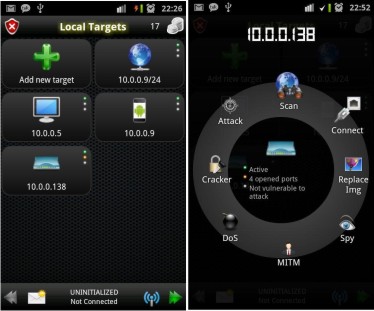
Extra Bonus : dSploit
dSploit is an Android network analysis and penetration suite which aims to offer to IT security experts/geeks the most complete and advanced professional toolkit to perform network security assesments on a mobile device. Once dSploit is started, you will be able to easily map your network, fingerprint alive hosts operating systems and running services, search for known vulnerabilities, crack logon procedures of many tcp protocols, perform man in the middle attacks such as password sniffing ( with common protocols dissection ), real time traffic manipulation, etc.

Note: This tutorial is only for Educational Purposes, I did not take any responsibility of any misuse, you will be solely responsible for any misuse that you do.

Blogger Widgets